
Key Cost Optimization Strategies:
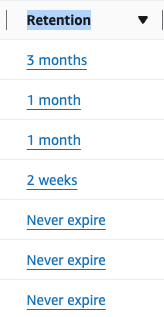
Set Retention Policies: By default, logs never expire. Change retention to 1 day, 1 week, or 30 days to avoid long-term storage fees for old logs.
Filter Log Levels: In production, change logging levels from DEBUG to WARN or ERROR to eliminate high-volume, low-value logs.
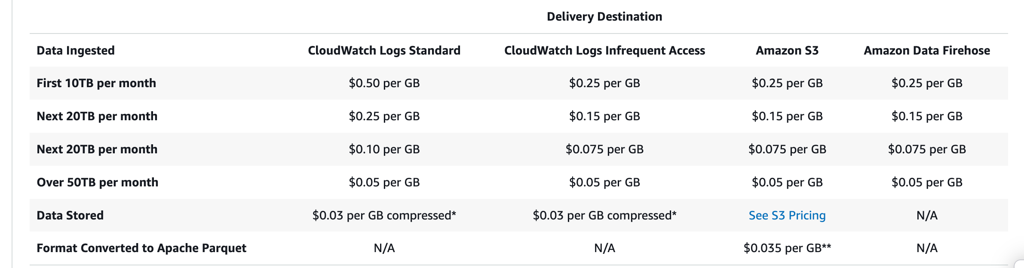
Utilize Infrequent Access Log Class: Use the Infrequent Access log class for log groups that are rarely viewed, which provides a 50% lower ingestion price compared to Standard.
Use Subscription Filters: Send high-volume log data to Kinesis Data Firehose or S3 for cheaper storage instead of storing it directly in CloudWatch Logs.
Implement Metric Filters: Instead of logs,
Extract specific metrics from logs and use those for alarms to avoid large-scale ingestion.
Audit Vended Logs: Optimize or disable VPC Flow Logs, Lambda logs, or Route 53 logs if they are not necessary for security compliance.
Subtitles are available in English, French and Spanish. Click here to get the full masterclass.
The IA log class has a 50 percent lower per GB ingestion price compared to the Standard log class. This blog post dives into how you can use the new IA log class for new log groups.
It is important to note that once a log group is created, you cannot change its existing class from Standard to IA or vice-versa. Therefore, make sure to only use the IA log class for a workload that doesn’t require advanced features provided by the Standard log class. Examples of use cases best suited for Infrequent Access:
Workloads that don’t require Standard log class advanced features such as Embedded metric format (EMF), Live Tail, Logs Anomaly Detection and Pattern analysis.
Debug logs or web server logs, as they are quite verbose and rarely require any of the advanced functionality.
Internet of Things (IoT) devices that send detailed logs that are typically only accessed for after-the-fact forensic analysis.
How to identify?
From our Cost Optimizations Report , check at CloudWatch_Storage_Classes section.
- In AWS Console, go to the CloudWatch service, then select the Log groups section. Click on the Settings icon and add the Stored bytes column. Filter log groups by Stored bytes to identify high-cost log groups.
How to fix?
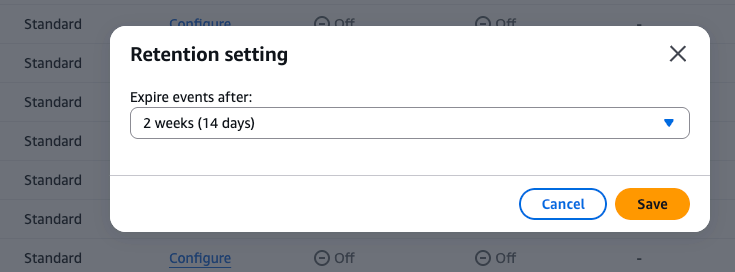
To set up retention period:
Ensure the logs are no longer needed.
Select the log groups you want to modify.
Click Actions > Edit retention setting(s).
Choose the new retention period and click Save.
To Use Infrequent Access (IA) Log Class:
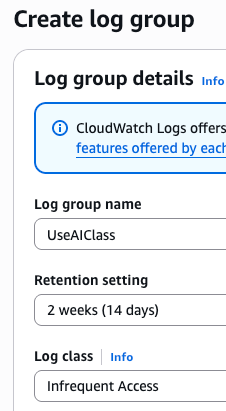
Create New Log Group: In the CloudWatch console, select Log groups -> Create log group.
Set Class: Under Log class, select Infrequent Access.
Migrate Data: Export old logs to S3, and delete the original Standard log group.
Update Configuration: Update your AWS services (e.g., EKS, Lambda) to use the new log group name.
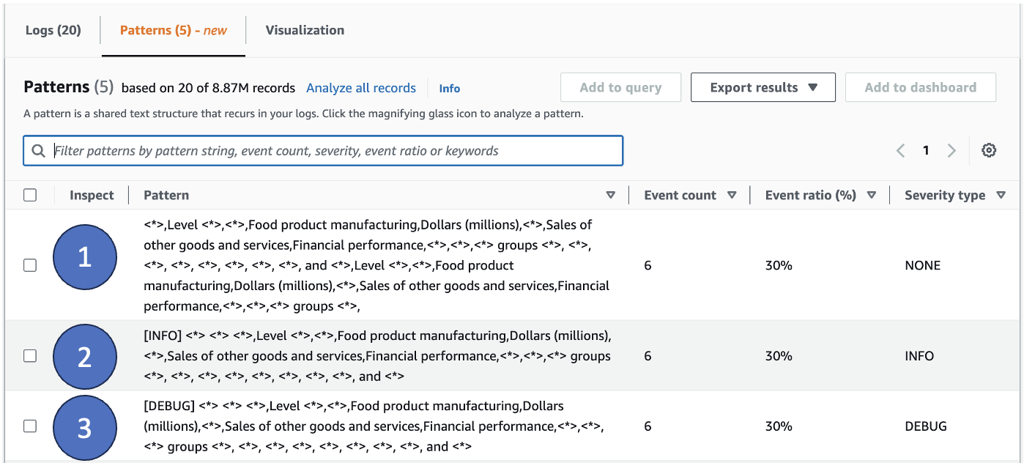
To Reduce Logs Quantity with CloudWatch Logs pattern analysis:
Use the CloudWatch Logs Anomaly Detection and Pattern Analysis to identify unusual events, and uncover trends and patterns across your logs. For example
Unhelpful logs – Error logs that just say “Error” without any context or actionable insights. In such situation, you can update your logs to capture the right level of detail to give you insights into your workload.
Unnecessary logs – In figure below, you can see that patterns 1 and 2 reflect the same set of data. The first one is a print statement and the second is a logged statement. Removing such logs which provide no additional value can help you save on logging costs.
Debug statements – In figure below, pattern three shows a Debug statement. Debug statements in a steady-state application could be producing more logs than needed. Check with your developers if debug statements in production logs are adding value to their real-time investigations. Otherwise if they are used for after the fact analysis, IA might be a great fit.
If the resource is provisioned automatically via IaC (such as CloudFormation or Terraform), update the corresponding code to reflect the changes.